ON-BOARD NAVIGATOR
The audio system for the car comes in distinct levels:
- “Basic” audio system with 8 speakers
- BOSE Hi-Fi audio system
- with or without “DAB” (new Digital Radio standard)
- with Bluetooth mobile phone management
- with navigator (in that case called UCONNECT TM 5” RadioNav) (described here).
For more details on the other versions, see
See descriptions 5570 ACCESSORIES
Navigation system
The navigation system, developed in collaboration with TomTom, is incorporated in the radio with pre-loaded maps of major European states;
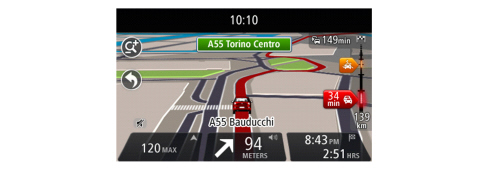
It is a complete 2D/3D map-based satellite navigation system. The map contains detailed European road maps including city streets as well as all major points of interest, including public utilities (police stations, hospitals, fuel stations, dealerships etc.) and leisure (restaurants, hotels etc.). Destinations can be searched by reading the database according to different criteria (closest point, name, telephone etc.).
Thanks to the hard disk, the GPS navigator does not require external disks. Geographical positions can be programmed by latitude and longitude, selected and saved in the navigator.
Radionavigator
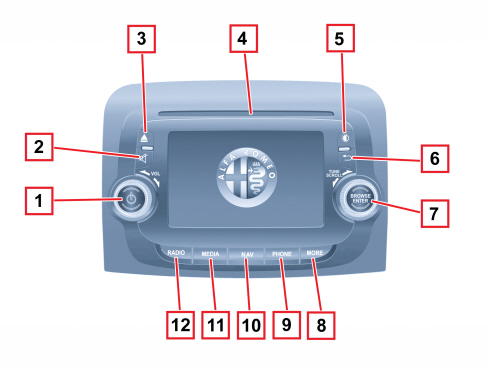
|
Button |
Functions |
|
1 |
Ignition |
|
Off |
|
|
Volume adjustment: (left/right knob rotation) |
|
|
2 |
Volume activation/deactivation (Mute/Pause) |
|
3 |
CD ejection |
|
4 |
CD housing |
|
5 |
Display on/off |
|
6 |
Exit the selection/return to previous screen |
|
7 |
Scroll through list or tune to a radio station (left/right knob rotation) |
|
Confirmation of the option displayed |
|
|
8 |
Access to the additional functions (display of Time, Trip Computer, Outside temperature, Settings) |
|
9 |
Phone data displaying |
|
10 |
Access to the Navigation menu |
|
11 |
Source selection: CD, USB/iPod, AUX or Bluetooth |
|
12 |
Accessing the Radio mode |
Steering wheel controls
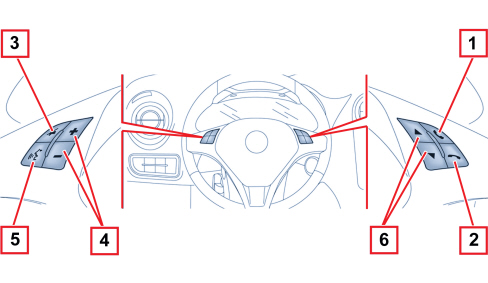
|
Button |
Interaction (pressure/rotation) |
|
1 |
- Accept incoming phone call - Acceptance of the second incoming phone call and putting the active phone call on hold - Activation of voice recognition for Phone function - Interruption of the voice message in order to give a new voice command - Interruption of voice recognition |
|
2 |
- Refuse incoming phone call - Ending of phone call in progress |
|
3 |
- Deactivation/reactivation of the microphone during a phone conversation - Activation/deactivation of the CD, USB/iPod, Bluetooth source Pause - Activation/deactivation of radio Mute function |
|
4 |
- Adjustment of the audio volume: hands-free system, SMS message reader, voice announcements and music sources |
|
5 |
- Activation of the voice recognition - Interruption of the voice message in order to give a new voice command - Interruption of voice recognition |
|
6 |
- Radio Mode: selection of previous/next station - CD, USB/iPod, Bluetooth mode, selection of previous/next track |
Navigation activation
Press the NAV button on the front panel to activate navigation mode.
Gps reception (global positioning system)
The GPS is a satellite system which provides worldwide information about time and position. The operation of this navigation system can be influenced by any change made to the availability and precision of the GPS or by specific environmental conditions.
When TomTom navigation is started for the first time, the system may require some minutes to determine the GPS position and display the current position on the map.
Afterwards the position will be found much more quickly (usually a few seconds are needed). The presence of big buildings (or similar obstacles) may sometimes interfere with the GPS signal reception.
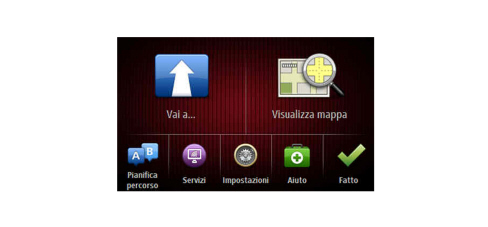
Planning a route
Just touch the screen to open the Main menu and plan a route:
Driving view
The information shown on the display during navigation is as follows
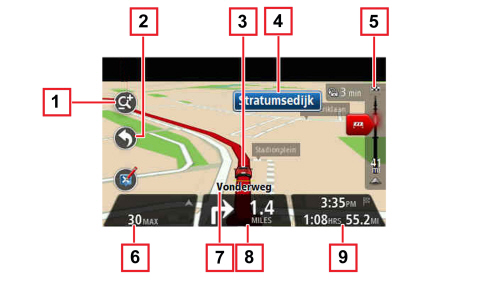
1 - Zoom button (touch the magnifying glass to display the buttons to zoom in or out)
2 - Quick access menu (touch “Create customised menu” to activate the quick menu)
3 - Current position
4 - Information about road signs or name of the following street
5 - Traffic side bar (displays the details on traffic issues along the route. The Traffic side bar is only displayed if the navigation system receives RDS-TMC information).
6 - Speed limit (if known) (Touch this part of the status bar to switch from a 3D map to a 2D map and vice versa).
7 - Name of the street you are driving in
8 - Navigation instructions for the way forward and distance until next instruction. (If the second instruction is at less than 150 m from the first one, it will be immediately shown in place of the distance. Touch this side of the status bar to repeat the latest voice instruction).
9 - Remaining travel time, remaining distance and expected arrival time. (Touch this part of the status bar to open the “Route summary” screen)
The information displayed in the status bar can be modified touching "Status bar" in the Settings menu.
As regards:
- Radio
- Media Player
- Phone
See descriptions 5570 ACCESSORIES
Other functions
Press the MORE button on the front panel to display the following operating settings:
- Clock;
- Compass;
- Trip Computer;
- Settings.
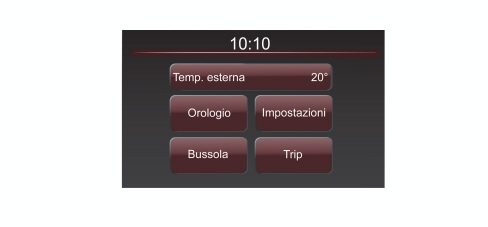
Settings
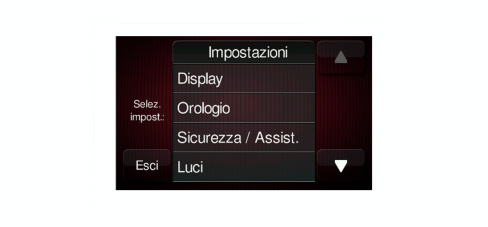
Press "Settings" to access the "Settings" main menu.
The menu comprises the following options:
- Display;
- Time and Date;
- Safety/Assistance (for versions/markets, where provided);
- Lights (for versions/markets, where provided);
- Doors and door lock;
- Audio;
- Phone/Bluetooth;
- Radio;
- Restore Default Settings.
Navigator connections
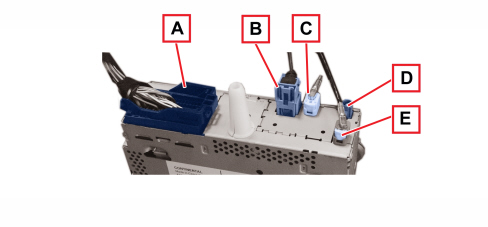
Connector A: 52-way, black
|
PIN |
FUNCTION |
|
1 |
not connected |
|
2 |
B-CAN H (B) |
|
3 |
not connected |
|
4 |
not connected |
|
5 |
not connected |
|
6 |
RH AUX-IN |
|
7 |
Reference AUX-IN |
|
8 |
not connected |
|
9 |
not connected |
|
10 |
not connected |
|
11 |
not connected |
|
12 |
B-CAN L (A) |
|
13 |
INT panel lighting |
|
14 |
not connected |
|
15 |
not connected |
|
16 |
LH AUX-IN |
|
17 |
Detect AUX-IN |
|
18 |
AUX-IN cable screen earth |
|
19 |
not connected |
|
20 |
not connected |
|
21 |
not connected |
|
22 |
not connected |
|
23 |
not connected |
|
24 |
not connected |
|
25 |
not connected |
|
26 |
not connected |
|
27 |
not connected |
|
28 |
not connected |
|
29 |
Microphone (screen) |
|
30 |
Microphone + (screened cable) |
|
31 |
not connected |
|
32 |
not connected |
|
33 |
not connected |
|
34 |
not connected |
|
35 |
not connected |
|
36 |
not connected |
|
37 |
not connected |
|
38 |
not connected |
|
39 |
not connected |
|
40 |
not connected |
|
41 |
Hi-Fi system amplifier enablement |
|
42 |
not connected |
|
43 |
Chassis earth |
|
44 |
+30 from F36 BCM |
|
45 |
Right rear speaker (+) |
|
46 |
Right front speaker (+) |
|
47 |
Left front speaker (+) |
|
48 |
Left rear speaker (+) |
|
49 |
Right rear speaker (-) |
|
50 |
Right front speaker (-) |
|
51 |
Left front speaker (-) |
|
52 |
Left rear speaker (-) |
Connector B – USB connection
|
PIN |
FUNCTION |
|
1 |
USB- Host |
White connector C, coaxial cable for radio aerial
Blue connector D, coaxial cable for DAB radio aerial
Blue connector E, coaxial cable for GPS aerial