
  |
 Removing
(
Refitting Removing
(
Refitting )
)
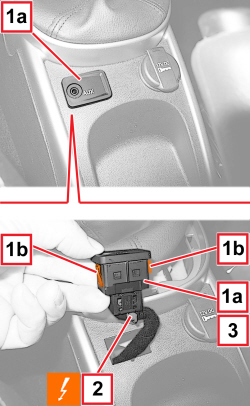
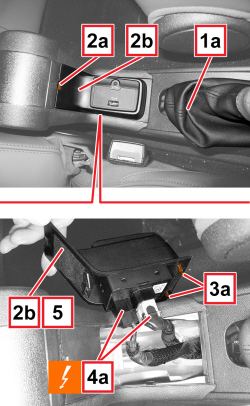
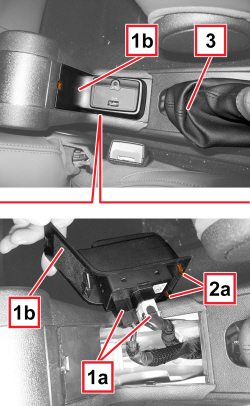
1. Using a plastic blade, extract the port (1a), releasing the two side retainers (1b). 2. Disconnect the electrical connection.
3. Keep the port (1a). |
APPLIES TO VERSIONS WITH: M.Y. 2013
|
APPLIES TO VERSIONS WITH: M.Y. 2013
|
  |
Removing
(
Refitting
)
|
  |
|
  |
Refitting
(
Removing
)
|
  |
|
|
|
|
|
|
Removing
(
Refitting
)
- Disconnect the negative battery terminal.
|
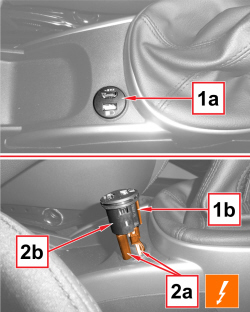  |
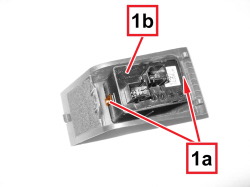
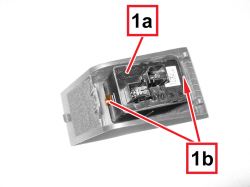
1. Release the multimedia device socket (1a) from the internal retainer (1b) and extract it from its position. 2. Disconnect the electrical connections (2a) and retrieve the multimedia device socket (2b).
|
|
|
Refitting
(
Removing
)
- Check that the component is intact and working, otherwise replace it. - Fit the multimedia device socket on the trim and engage the internal retaining clips. - Connect the electrical connections.
|
|
|
- Connect the negative battery wire terminal.
|