

 Removing
(
Refitting
Removing
(
Refitting )
)
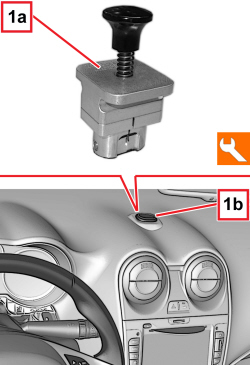
1. Fit the suitable tool (1a) in the socket (1b) for the navigator.
|
Tool |
Name |
Function |
Validity |
|
2000031500 |
Extractor |
Removing car navigator |
|
|
Removing
(
Refitting
)
1. Fit the suitable tool (1a) in the socket (1b) for the navigator.
|
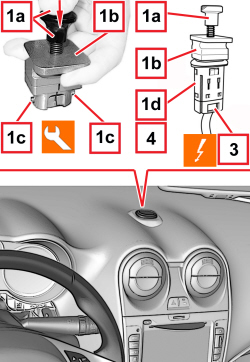  |
1. Press and hold pressed the knob (1a) of the tool (1b) to take out and engage the retainers (1c), then remove the navigator socket (1d) with caution. 2. Release the knob (1a) and remove the tool (1b) from the socket (1d). 3. Disconnect the electrical connection for the navigator socket.
4. Keep the navigator socket. |
  |
Refitting
(
Removing
)
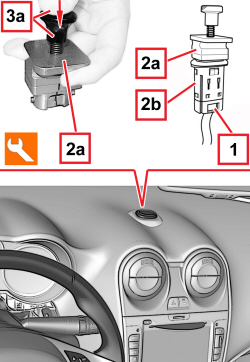
- Check that the navigator socket is not damaged. 1. Connect the electrical connection for the navigator socket. 2. Fit the suitable tool (2a) in the socket (2b) for the navigator.
3. Press and hold pressed the knob (3a) of the tool (2a) and cautiously engage the navigator socket (2b) in this housing. 4. Release the knob (3a) and remove the tool (2a) from the socket (2b). |