145 - MiTo   1.4 16v TJet   SWITCH FOR FACIA COMPARTMENT LIGHT - R+R   7040G24   

Detail     Detail

Removing ( Refitting )

   Op. 7040G20 BULB HOLDER FOR COMPARTMENT LIGHTING IN DASHBOARD - R.R.

   Op. 7040A31 DASHBOARD COMPARTMENT ASSEMBLY - R.R.


Enlarge the image


1. Open the glove compartment slightly.

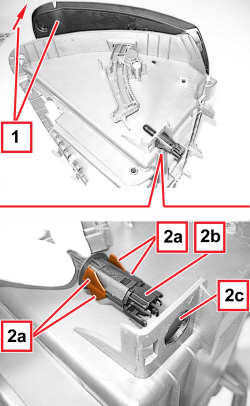
2. Fold the four tabs (2a) on the switch (2b) body, then extract the actual switch from the housing (2c).

Refitting ( Removing )

- Check that the switch is not damaged.

- Fit the switch in place folding the four tabs.

   Op. 7040A31 DASHBOARD COMPARTMENT ASSEMBLY - R.R.

   Op. 7040G20 BULB HOLDER FOR COMPARTMENT LIGHTING IN DASHBOARD - R.R.

APPLIES TO VERSIONS WITH: Right-hand drive


Enlarge the image


Removing ( Refitting )

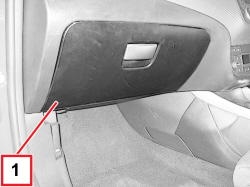
1. Open the dashboard compartment.

APPLIES TO VERSIONS WITH: Right-hand drive


Enlarge the image


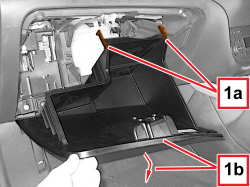
1. Release the end of travel retainers (1a) and lower the dashboard compartment (1b).

APPLIES TO VERSIONS WITH: Right-hand drive


Enlarge the image


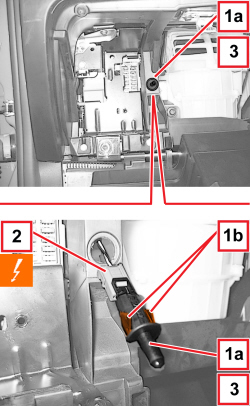
1. Carefully remove the switch (1a) releasing the flexible tabs (1b).

2. Detach the electrical connection.


Description


Connector


2


COMPARTMENT LIGHT SWITCH


   See I015 GLOVE COMPARTMENT LIGHT SWITCH

3. Keep the switch.

APPLIES TO VERSIONS WITH: Right-hand drive

Refitting ( Removing )

- Check that the switch is not damaged.

- Attach the electrical connection.

- Place the switch in position and engage the flexible tabs.

- Lift the dashboard compartment and engage the end of travel retainers.

- Close the glove compartment.