145 - MiTo   1.4 16v TJet   BLUE &ME USB PORT - R.R.   5570T55   

Detail     Detail


Enlarge the image


Removing ( Refitting )

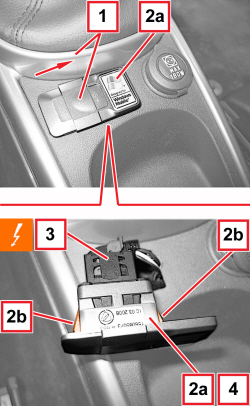
1. Close the USB port cover.

2. Using a plastic blade, extract the USB port (2a) releasing the inner retainers (2b).

3. Detach the electrical connection.


Description


Connector


3


USB PORT


   See P143 USB PORT

4. Keep the USB port.

Refitting ( Removing )

- Check that the USB port is not damaged.

- Connect the electrical connection.

- Position the USB port and engage the internal retainers.

APPLIES TO VERSIONS WITH: M.Y. 2013


Enlarge the image


Removing ( Refitting )

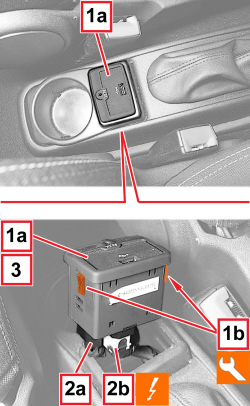
1. Working on the tunnel trim, raise the USB port (1a) releasing its two side retainers (1b), with the special tool.


Tool


Name


Function


Validity


1823014000


Knife


Retainer removal


2. Disconnect the electrical connections (2a, 2b).


Name


Connector


2a,2b


USB - AUX PORT


   See P157 USB - AUX PORT

3. Keep the USB port (1a).

APPLIES TO VERSIONS WITH: M.Y. 2013

Refitting ( Removing )

- Check that the USB port is not damaged.

- Connect the electrical connections for the USB port.

- Place the USB port in its housing and engage its two side retainers.

Removing ( Refitting )

- Disconnect the negative battery terminal.


Name


Connector


-


BATTERY


   See A001 BATTERY


Enlarge the image


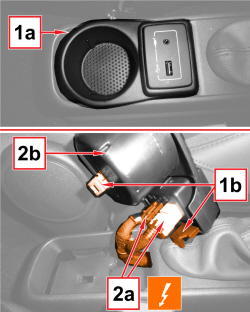
1. Release the retainers (1b) and prise the USB socket out of its position (1a).

2. Disconnect the electrical connections (2a) and keep the USB socket (2b).


Name


Connector


2a


USB - AUX PORT


   See P157 USB - AUX PORT

Refitting ( Removing )

- Check that the component is intact and working, otherwise replace it.

- Fit the USB socket on the trim and engage the retaining clips.

- Connect the electrical connections.


Name


Connector


-


USB - AUX PORT


   See P157 USB - AUX PORT

- Connect the negative battery wire terminal.


Name


Connector


-


BATTERY


   See A001 BATTERY