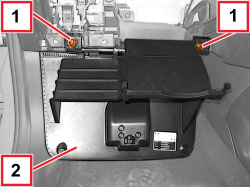
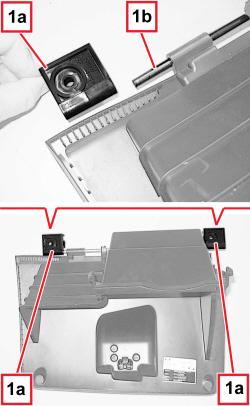
Removing
(
Refitting
Removing
(
Refitting )
)
Op. 7040G20 BULB HOLDER FOR COMPARTMENT LIGHTING IN DASHBOARD - R.R.
|
|
Removing
(
Refitting
)
Op. 7040G20 BULB HOLDER FOR COMPARTMENT LIGHTING IN DASHBOARD - R.R. |
|
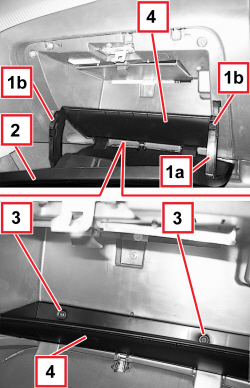  |
1. Disconnect the stopper tie-rods (1a) by releasing the end terminals (1b). 2. Lower the hatch slightly. 3. Unscrew the bolts. 4. Remove the compartment. |
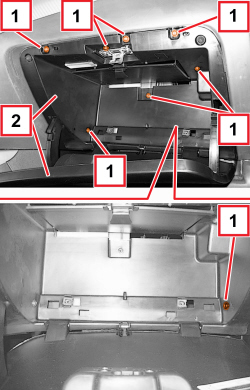  |
1. Unscrew the bolts. 2. Move the oddment compartment unit. |
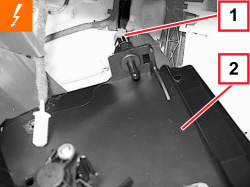  |
1. Detach the electrical connection.
2. Keep the compartment assembly. |
|
|
Refitting
(
Removing
)
- Check that the compartment is not damaged. - Connect the electrical connection. - Position the glove compartment assembly. - Screw in the bolts. - Position the compartment. - Screw in the bolts. - Connect the stopper tie-rods by engaging the end terminals. Op. 7040G20 BULB HOLDER FOR COMPARTMENT LIGHTING IN DASHBOARD - R.R. |
|
APPLIES TO VERSIONS WITH: Right-hand drive
|
APPLIES TO VERSIONS WITH: Right-hand drive
|
APPLIES TO VERSIONS WITH: Right-hand drive
|
APPLIES TO VERSIONS WITH: Right-hand drive
|