




|






|
|
| Service News | ||
|
|
Various Modes (159 - Brera/Spider - MiTo)
All models |
|
|||
| 5570 T 000 AA |
BLUE&ME™ NAV CONTROL UNIT
Instructions for replacement - Network Information |
|||

|
Cancels and replaces SN 55.10.08 of 20/06/2008 for information about INFO and S.O.S. services. |
OPERATIONS IN NETWORK
We wish to remind you that if the Blue&Me™ Nav control unit is being replaced, to ensure the activation of the services activated previously by the customer, the following should be done:
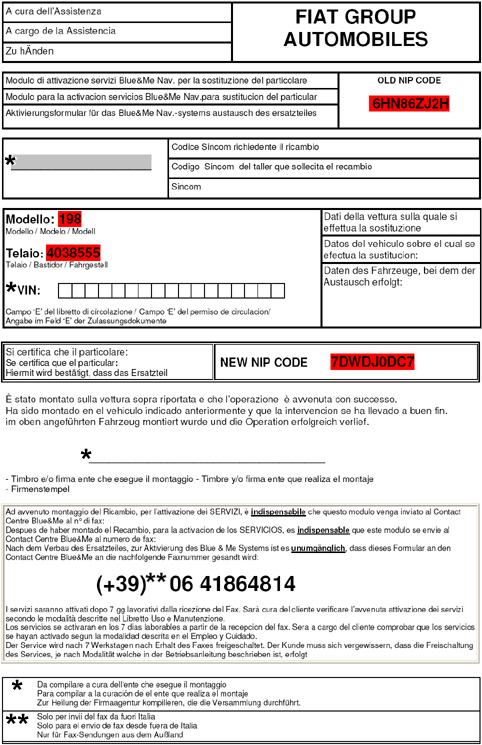
-Order the new control unit through the E-Plus system following the instructions for the type of order known as "Blue&Me order entering" (see paragraph below).-When the component is received, the Parts packaging will contain a form (see examples in Fig. 5 and 6) to be used if the customer has subscribed to services (Info service, S.O.S., Insurance services, etc.), along with the control unit. For the reactivation of these services, complete the fields in the form marked with an asterisk (*) and fax the form to the number given (+39 06 41864814)-After fitting the new control unit, carry out the PROXI alignment procedure using the Examiner.-Also remind the customer to carry out the pairing operation for the telephones to be connected.-The services will be activated 7 working days after receipt of the fax. The customer will verify the activation of the services according to the procedures described in the Owner Handbook. | If you try and order a replacement Blue&Me™ Nav for a vehicle not fitted with this device, the system will reply with the following message "No NIP code associated with the Chassis Model specified!" |
| If it proves impossible to enable the services and/or order the control unit, refer to Service News 55.05.08 |
| THE INFO SERVICE WAS INTERRUPTED STARTING FROM 01/01/2011. THE S.O.S. SERVICE WILL BE OPERATING FOR ALL THE TIME OF THE CONTRACT WARRANTY. |
Procedure for "Blue&Me order entering" (*)
-select Order Management (1 - Fig. 1) and then Blue&Me order entering (2); the screen in Fig. 1 will be displayed | Only Blue&Me™ Nav control units can be ordered using the Blue&Me order entering type; for other coded products, use the standard channels. |
Fig. 1
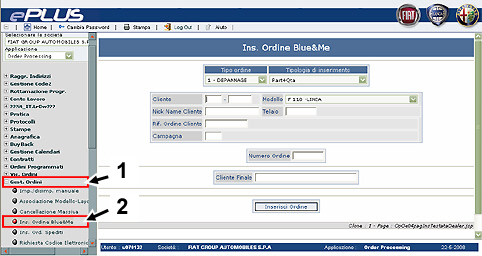
Fig. 2
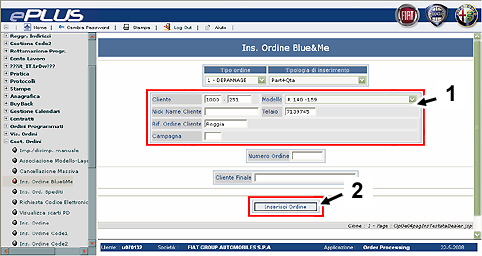
Fig. 3
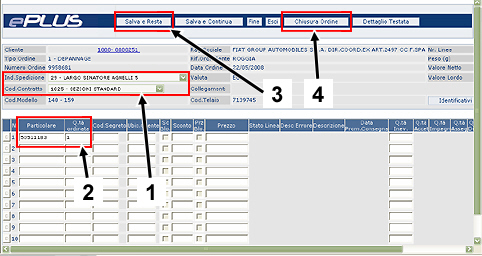
Fig. 4
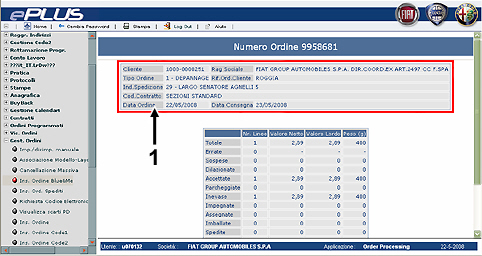
Fig. 5 - Example of form in Italian, English and French
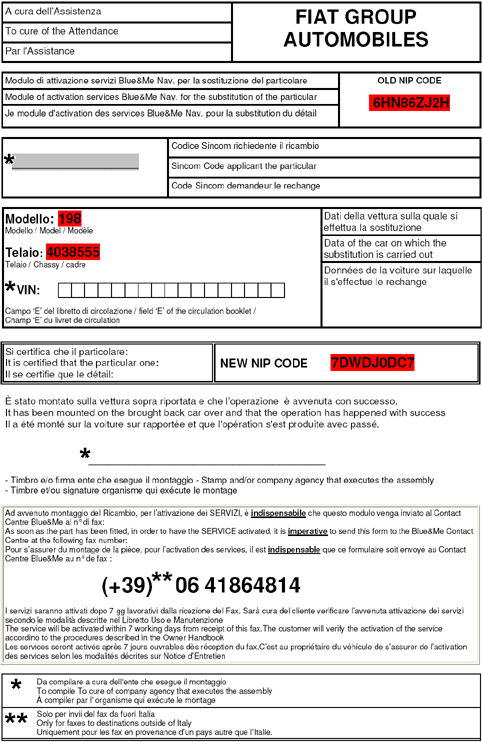
Fig. 6 - Example of form in Italian, Spanish and German