Connect the SMART Examiner diagnostic equipment and connect the SAM interface to the instrument and then the cable probes to the same interface;
connect the disconnector AD-226 to the sensor and to the ABS wiring and select the Voltmeter instrument on Examiner. Insert the probes in bushes (1,2) of the adaptor (as in Fig. 1)
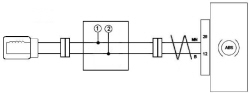
FIG.1
Measuring the phonic wheel sensor signal
Select the following full scale deflection on the voltmeter:
Voltage: 20.0 Volts f.s.
Time base: 2 seconds
Turn the wheel manually and when the rotation speed reaches 4-6 Km/hr press the "Start" button on Examiner remembering that during download, manual acceleration or braking of the wheel must not take place.
To carry out the necessary download, disconnect everything and then start the ABS control unit test, delete any errors created during download (interference on signal speeds, rear left speed sensor not plausible, ...)
N.B. During signal download no battery charge should be connected.
Reading the signals
The voltage value of a phonic wheel sensor should regularly and continually vary.
A signal is regular when all the download is free from "holes".
Take care to press "Start" for the download when the wheel is constantly turning otherwise the signal reading may produce errors.
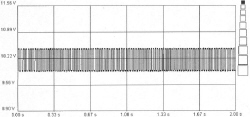
a) Regular signals between the phonic wheel sensor (Speed Turn: 4-6 Km/h)
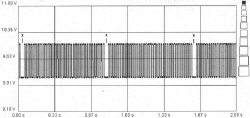
b) Faulty signals due to the presence of metallic slag (point X) on the flywheel magnetic race (Rotation speed 4-6 km/h).
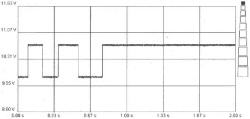
c) Irregular signal for wheel rotating after Start
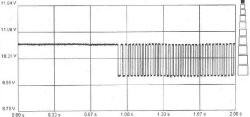
d) Irregular signal due to wheel stopped during acquisition