





|






|
|
| Service News | ||
|
|
Various models
Version: T.T. with navigator |
|
|||
| 5580 0 000 AA |
NAVIGATOR - MAP UPDATING
Network Information |
|||

|
Cancels and replaces SN 55.006.17 of 30/06/2017 for the update of the reference table. |
GENERAL INFORMATION
The following information is provided below to allow verification of the availability of updated maps for the navigators of current and recent models:
A - Reference table
Table which summarises all the map updates currently available at the time of publication.
|
|
The reference table is updated regularly, but given the frequency with which suppliers issue map updates, it is possible that updates more recent than those listed in the table may be available. |
B - VP4 device activation code request
Procedure for requesting the activation code for VP4 device map updating on the HERE portal

|
Before any operation on the navigator (reprogramming, map updates, etc.) always check whether the operation to be performed corresponds to the type of navigator installed on the vehicle. |
|
|
Some models (such as Fiat 500X, Fiat Tipo, Alfa Giulia and Stelvio, etc.) are covered by the Mopar MapCare service, allowing downloading of new maps directly from the link.e.entry portal, and installation of the updates on the navigation devices of the vehicles included in the programme. (For further information about the Mopar MapCare service, see Service News 55.015.18). |
A - REFERENCE TABLE
The reference table (attached pdf file for download, updated to February 2018) contains the following information:

|
Brand / Model
The brand and model of the vehicle, respectively.
Nav Supplier
Supplier of the navigator installed on the vehicle. NOT the supplier of the maps.
Type
Type of navigator installed on the vehicle.
Maps version available
This column indicates whether or not a map update is available for the device / model considered.
The following table shows some examples.
|
Example |
Description |
|
Yes - Q4/15 - 01/07/2016 |
A map update with cartography as of the fourth quarter of 2015 is available and can be purchased with effect from July 2016. |
|
MOPAR MAPCARE |
The car is included in the MOPAR MAPCARE program, allowing downloading of new maps directly from the link.e.entry portal. |
|
Available Soon |
The service will be available soon; the procedures will be detailed in an update to this SN. |
Update mode
The update can be installed by means of the following devices:
• SD
Update by means of SD card with maps preloaded onto the card.
• DVD
Update by means of DVD with maps preloaded onto the disk.
• USB
Update by means of USB memory stick with maps preloaded onto the stick.
• Download
Update by downloading the maps from the Internet site to a standard USB stick.
Who can update
This column indicates who is able to purchase and update maps
• Customer
Customers can purchase and update maps themselves.
• Dealer
Customers must visit Dealerships to have their maps updated.
• Customer / Dealer
Maps can be updated by either the Customer or the Dealership network.
|
|
For VP4 devices it may necessary to update the device's software version as well as the maps, so Customers are unable to perform the procedure themselves. For further info, see section B below and refer to the instructions supplied with the maps at the time of purchase. |
Map Supplier
Supplier of the maps, who must be contacted for purchases.
Depending on the supplier, visit the Internet site listed below and place the order on the basis of the information provided.
- Here - www.navigation.com/doc-emea
- TomTom - http://it.support.tomtom.com/app/answers/detail/a_id/18874/locale/it_IT
- Daichii - https://daiichi.eu/product-category/avn/fiat/
To update all portable navigation devices (PND) visit the following TOMTOM link
- http://it.support.tomtom.com/app/answers/detail/a_id/13849/locale/it_IT
B – MAP UPDATES FOR VP4 DEVICES
General information
The maps of VP4 devices can be updated by means of a specific online purchasing platform called the DOC (Dealer Ordering Center) accessible from the HERE portal, where, after registration, it is possible to order:
- Master Kit
- Activation code
The Master Kit consists of 2 USB memory sticks:
- The first stick contains the update software release for the navigation device, which must be updated (if necessary) before the maps themselves. If the SW version on the device is equal to or higher than the one supplied with the Master Kit, no SW update is required.
- A second memory stick contains the map update.
An activation code is need to render the map update operational.
Notes
- Dealers will receive just one Master Kit
- The Master Kit can be used for multiple updates on an unlimited number of devices
- Every single update requires a specific activation code
- Activation codes are only available from the HERE DOC portal
The DOC platform is active for the FIAT / LANCIA / ALFA / CHRYSLER / JEEP Brands
Platform support and maintenance are provided by HERE
The main features of the HERE DOC system are:
- Multilingual consultation
- Easy, secure way of purchasing map updates
- Available 24 hours a day, 7 days a week
- Different, unique username and password for every Dealer
- No paper order
- New map updates immediately available for order
- Online traceability of deliveries
Registration and access
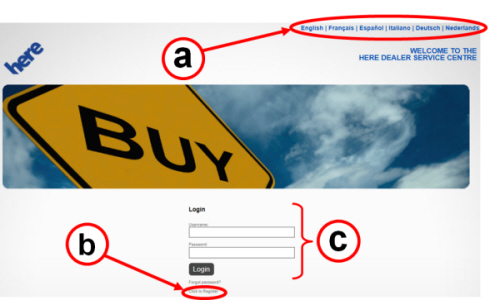
To connect to the HERE portal you need to have an Internet connection; entering the address www.navigation.com/doc-emea, will display the Home page (Fig. 1).
You will need to register with HERE on your first access only, proceeding as follows:
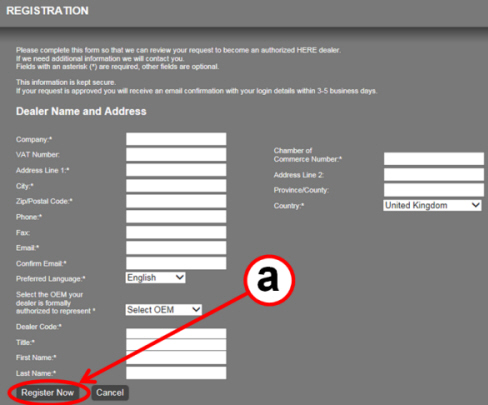
- On the Home Page, select your language (a – Fig. 1) and then ask to register (b); the screen shown in Fig. 2 will appear.
Fig. 1 - HERE portal - Home page

- Enter the data requested then ask to Register Now (a – Fig. 2).
- If the application is approved, within 3-5 working days the Dealer will receive a confirmation email containing the Username and Password to be entered in the respective fields (c – Fig. 1) to access the HERE portal (Login).
|
|
The fields marked with an asterisk and the VAT Number field must always be filled in. |
Fig. 2 - HERE portal - registering for the 1st time
Map updating
After registration, to perform a map update proceed as follows, in this order:
1. Order the Master Kit.
2. Obtain the vehicle's Request Code and VIN (chassis number).
3. Order the Activation Code.
4. Update the maps of the VP4 device
1. Order the Master Kit.
- Access the DOC from the HERE portal; the list of Products available will appear
- For VP4 devices, select RG4 6.5"
- After selecting RG4 6.5", enter the quantity (recommended quantity = 1), add the product to the cart and place the order.
2. Obtain the vehicle's Request Code and VIN (chassis number).
Request Code
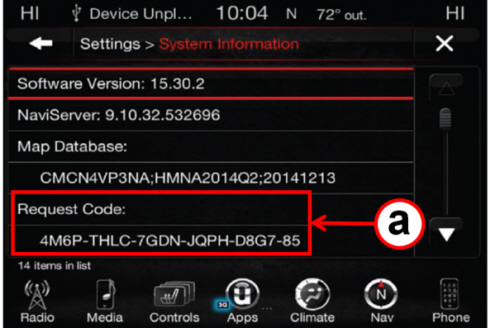
- To obtain the Request Code, connect the USB stick from the Master Kit ordered previously to the USB port of the Uconnect system.
- Select Setting > System Information.
- The system will display the Request Code necessary for updating the maps (a – Fig. 3). Make a note of the code.
Fig. 3 - Request Code
Vehicle's VIN (chassis number)
- Make a note of the complete VIN (chassis number).
|
|
The VIN appears on the registration certificate and is punched into the floor of the cockpit. On some vehicles, it also appears in the top left-hand corner of the dashboard finishing, visible through the windscreen from the outside of the car. |
3. Ordering the activation code.
- Access the DOC from the HERE portal.
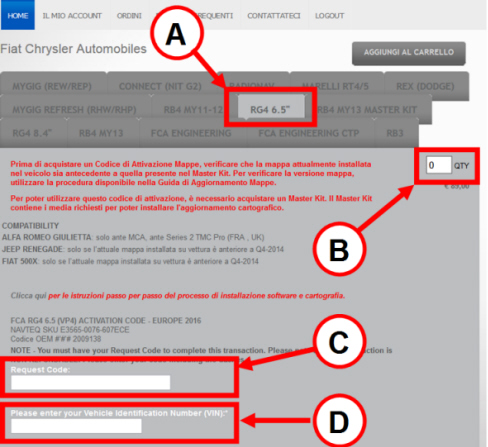
- Select the device (RG4 6.5") (A – Fig. 4).
- Enter the quantity (1) (B – Fig. 4).
- Enter the Request Code (C – Fig. 4).
- Enter the chassis number (VIN) (D – Fig. 4).
- Add the product to the cart and place the order.
Fig. 4
- Additional screens follow, prompting the user to confirm the order request and the delivery and payment methods.
|
|
Read all the instructions and warning messages displayed; do not continue with the following messages without performing all the required procedures asked by the prompts. |
- If all the data entered are correct, a screen containing the activation code and order number will appear. Within a short time, the activation code and order number will also be dispatched in an email reply.
- Once the Master Kit and Activation Code have been received, the map updating procedure can go ahead.
4. Updating the maps of the VP4 device
To perform a map update proceed as follows, in this order:
|
|
Start the engine and leave it running - ( safely ) - for the duration of the updating. |
- Take the memory stick containing the software release from the Master Kit and connect it to the USB port of the Uconnect system.
- The device's display will show the installed software version and propose the new update software version contained in the USB stick.
- If the software version on the Master Kit USB stick is later than the one installed in the device, proceed to update the software; otherwise, remove the USB stick and continue the map update.
- Once the software has been updated, remove the software update USB stick and connect the map update stick, taken from the Master Kit.
- The display will show the sequence of instructions to be followed to update the maps correctly; during the update, you will be prompted to type the Activation Code.
|
|
Read all the instructions and warning messages displayed during reprogramming; do not continue with the following messages without performing all of the relevant procedures when prompted. |
NOTES
- Throughout the update procedure, the USB stick must remain connected to the port, the VP4 device must be switched on and the engine must be running.
- The update procedure can last more than 30 minutes.
- The map files currently in the system will be deleted and replaced with the new ones.
- The navigator will not be available during the update.