





|






|
|
| Service News | ||
|
|
Alfa MiTo
All models |
|
|||
| 5580 2 051 R1 |
RADIO NAVIGATOR
Difficulty in reading the SD card – Service Solution |
|||

|
Cancels and replaces SN 55.07.11 of 03/05/2011 for new fault code (R1 instead of RA) |
CLAIMED FAULT
Difficulty in reading the SD card.
The display may show one of the following messages:
- SD card safe removal not used. Possible delay or application problems.
- Wrong map version detected. This SD card cannot be used by the system.
- Map SD card unusable - and after 30 seconds, the following appears: Now you can remove the SD card.
- Unknown SD card detected. This SD card cannot be used by the system
- Map licence missing. Select Map Licence Activation to activate a new licence
- The temporary map licence has expired. Select Map Licence Activation to activate a new licence.
TECHNICAL CAUSE
Faulty SD card reader.
OPERATIONS IN PRODUCTION
Adoption of radio navigators with an improved SD card reader.
IMPLEMENTATION OF MODIFICATION
|
Version |
Plant |
Line |
Chassis no. |
Organisation No. |
|
All concerned models |
Mirafiori |
- |
1148732 |
147198 |
OPERATIONS AT THE DEALERSHIPS
DEALERSHIP BEHAVIOUR STANDARDS TOWARDS THE CUSTOMER
- Once the customer's claimed fault is confirmed, reassure the customer that it will be solved by replacing the radio navigator (where necessary)
- After the operation, show the customer what has been done and make sure he/she is satisfied
Service Solution
Only on vehicles in the lot of chassis numbers from 1123559 to 1148731,for a reported and ascertained fault and depending on the production date, replace the radio navigator according to the Operating Cycle below.
OPERATION CYCLE
Find the radio navigator code and read the production date as described in the procedures below.
If the date is from 13/07/2010 to 13/10/2010, replace the radio navigator with a new one from the Spare Parts Dpt., as described in Op. 5580M02 of the Service Manual.
READING THE DEVICE CODE
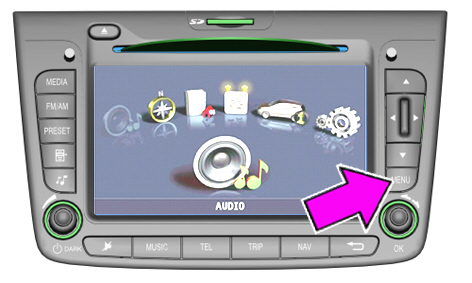
1 - Wait until the radio navigator switches on, the logo disappears and the main MENU is displayed (Fig. 1)
2 - Press the MENU button and hold it down until the screen shown in Fig. 2 appears
Fig. 1
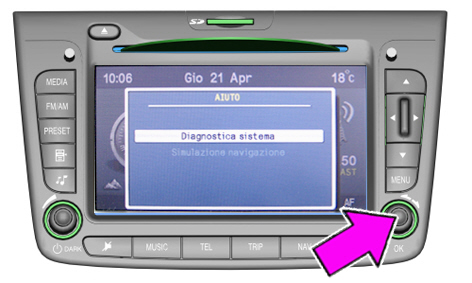
3 - Select the item System diagnosis (Fig.2) and press OK. The screen shown in Fig.3 will appear
Fig. 2
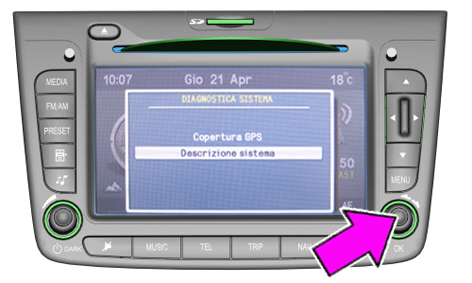
4 - Select the item System description (Fig.3) and press OK. The screen shown in Fig.4 will appear
Fig. 3
5 - Note down the last 3 digits of the Device code (77K in the example of Fig. 4) to get the production date.
Fig. 4
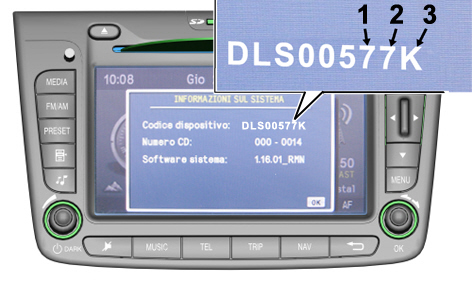
1. Day
2. Month
3. Month
PRODUCTION DATE CODING
The last 3 digits of the Device Code correspond to the day, month and year of the radio navigator production.
The following tables show the number/letter code displayed and the corresponding day, month and year.
In the example of Fig. 4, the code 77K corresponds to 07/07/2010.
DAY CODE
Correspondence between the displayed code and the day of the month
|
Part |
Day |
Part |
Day |
Part |
Day |
Part |
Day |
|
1 |
1 |
9 |
9 |
H |
17 |
P |
25 |
|
2 |
2 |
A |
10 |
I |
18 |
Q |
26 |
|
3 |
3 |
B |
11 |
J |
19 |
R |
27 |
|
4 |
4 |
C |
12 |
K |
20 |
S |
28 |
|
5 |
5 |
D |
13 |
L |
21 |
T |
29 |
|
6 |
6 |
E |
14 |
M |
22 |
U |
30 |
|
7 |
7 |
F |
15 |
N |
23 |
A |
31 |
|
8 |
8 |
G |
16 |
OR |
24 |
- |
- |
MONTH CODE
Correspondence between the displayed code and the month
|
Part |
Month |
Part |
Month |
Part |
Month |
Part |
Month |
|
1 |
1 |
4 |
4 |
7 |
7 |
A |
10 |
|
2 |
2 |
5 |
5 |
8 |
8 |
B |
11 |
|
3 |
3 |
6 |
6 |
9 |
9 |
C |
12 |
YEAR CODE
The letter K corresponds to the year 2010. If there is a letter other than K, do nothing.
PARTS AVALABILITY
|
Version |
Description |
Order no. |
Q.ty |
|
All concerned models |
Radio navigator without TMC PRO function |
156087352 |
1 |
|
All concerned models |
Radio navigator with TMC PRO function |
156091875 |
1 |
TMC PRO: System managed by a provider that supplies traffic information dynamically, available for some markets only.
CLAIM REPORT DATA
|
Version |
Operation |
Part |
Fault |
Position |
Time allowance |
|
All concerned models |
5580205 |
1 |
R1 |
- |
0.30 |