





|






|
|
| Service News | ||
|
|
Alfa various models
Version: MiTo and Alfa 159 with Blue&Me Nav and S.O.S. service |
|
|||
| 5570 1 601 R6 |
BLUE & ME™ NAV (C3) SYSTEM
Missed update to software release 5.5, with error USB 10 on the instrument panel – Service Solution |
|||

|
Cancels and replaces the following Service News: • SN 55.13.10 of 22/12/2010 for a new software release, validity extension to Alfa 159 model and interruption of the INFO service. • SN 55.13.10 on 27/01/2011 for new fault code (R6 and not RA) |
CLAIMED FAULT
Error USB 10 displayed on the instrument panel after software update attempt to release 5.5.
OPERATIONS AT THE DEALERSHIPS
DEALERSHIP BEHAVIOUR STANDARDS TOWARDS THE CUSTOMER
- Once the customer's claimed fault is confirmed, reassure the Customer that it can be solved by updating the Blue&Me™system control unit.
- After completing the operation, illustrate what has been done and ensure that the Customer is satisfied.
Service Solution
Once the customer's claimed fault is confirmed, check the control unit software release and update it, if required, according to the Operating Cycle below.
OPERATION CYCLE
Check whether updating is necessary
Check whether the software needs updating as follows:
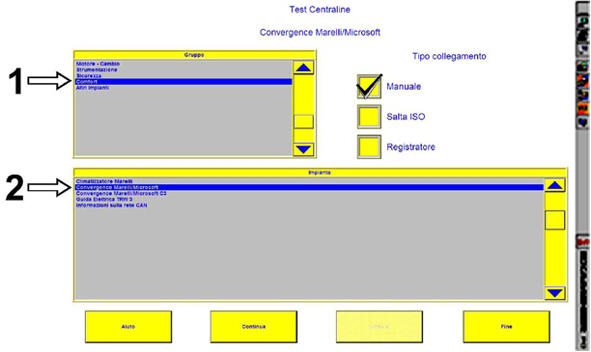
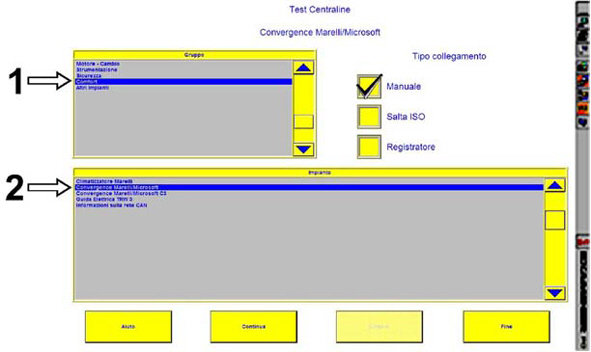
- Connect using the EXAMINER and, in the Control Unit Test environment, select the item Comfort in the Group menu (1 - Fig. 1) and then the item Marelli/Microsoft Convergence in the System menu (2 - Fig. 1).
Fig. 1
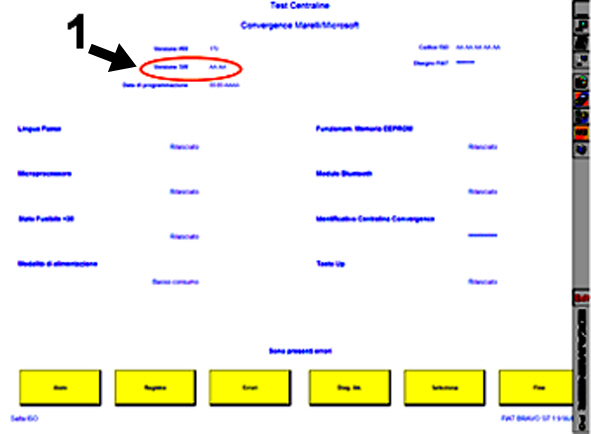
- Check the control unit software release (1 - Fig. 2).
Fig. 2
If the control unit software release is one of the following versions:
- 6314 -7152 - 8132 - 9037 - 9216 - 0137 - 8137 - 8165 - 8182 - 8291 - 9023 - 8016 - 8106 - 8127 - 8345
check the availability of S.O.S service and update.
If the software release is not included in the versions above, DO NOT continue with the updating.
|
|
THE INFO SERVICE WAS DISCONTINUED STARTING FROM 01/01/2011. THE S.O.S. SERVICE WILL BE OPERATING FOR ALL THE TIME OF THE CAR CONTRACT WARRANTY. |
A - Check of S.O.S. service availability
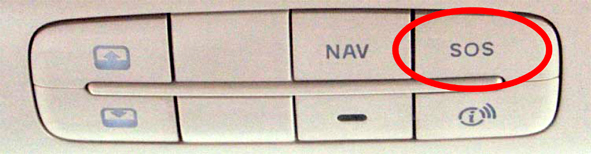
Press the button SOS on the roof light (Fig. 3)
Fig. 3
If the S.O.S. service is available, the instrument panel displays the screen of Fig. 4, with the time left before the call.
Fig. 4
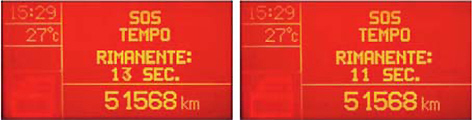
Before the counting reaches 0 seconds, press the button SOS (Fig. 3) on the roof light again, to cancel the request.
The service may have been interrupted (Fig. 5); in this case, perform the update in any case.
Fig. 5
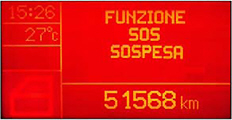
In this case, after updating the service is displayed as not available
Fig. 6
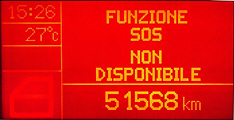
B - Equipment required for control unit software updating
Before updating the software, check that the following equipment is available:
- Personal Computer with Windows© 2000 / Windows© XP / Windows© VISTA.
- Internet connection to website.
- USB memory stick with manufacturer's certification of compatibility with Windows© 2000 / Windows© XP / Windows© VISTA operating systems.
C - Software updating procedure
- Download the file:

|
- Unzip the file into a suitable dedicated directory (e.g. c:\Blue&Me).
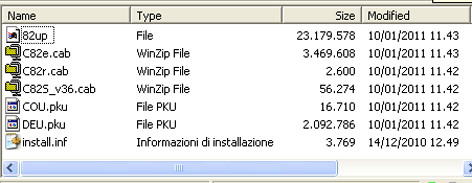
- At the end of the operation, make sure that only the files illustrated in Fig. 7 are present.
Fig. 7
- Arrange a USB memory stick, capacity at least 128 Mb, formatting it in FAT32 to cancel all previous data.
|
|
It is advisable to use USB memory sticks with capacity below 8 Gb. |
- Store on the USB memory stick, in the main directory (folder), all previously downloaded files, making sure they correspond. The updating is not performed is the files are only on the memory stick inside a directory.

|
Before starting the updating, turn the mobile phone off. During software update, no buttons must be pressed on the steering wheel. |
|
|
The update time depends on the car and the USB memory model; as an average, it can vary from 5 to 15 minutes. |
- With vehicle stopped and ignition key turned to STOP, place the USB memory stick in the Blue&Me™ NAV port at the bottom of the central console.
|
|
Updating is not available for vehicles NOT fitted with USB mediaplayer port. Do not use the diagnosis USB port of the control unit. |
- Place the ignition key on MAR, without starting the car, switch the radio on, clearing all warning messages (e.g. door open) on the panel display by pressing the button "Mode" or "Menu" (depending on the car model).
|
|
Never take out the memory stick from the USB port before the software update procedure is completed successfully. The memory stick remains inserted even if the information "RE-START…" or "INSTALLATION IN PROGRESS..." is displayed, followed by date and time; the radio starts to play again even for a few minutes. |
- The following message appears on the control panel display: “UPDATING” and the voice message “update started” will be heard. If this does not occur, place the key to STOP position and to MAR - ON again. During upgrade, the display shows some messages about the progress.
- At the end of the updating, the instrument panel display shows the voice command "COMPLETE" and the voice command "upgrade completed, remove the USB memory stick”.
- The Blue&Me™ NAV updating process is complete, turn the ignition key to STOP and remove the USB memory stick.
- Restart the car with key in MAR position and wait for about 2 minutes.
If the update is not complete the message “USB xx error” will be displayed and the following voice message will be played: "An error has occurred during updating". In this case, repeat the procedure.
D - Check to be carried out at the end of the updating
- Use Examiner to check if the control unit software release has been modified.
- Press twice the button TEL on the steering wheel and check the relevant message on the instrument panel (it should be like NO PHONE CONNECTED).
- Press the S.O.S. button and check whether the service is available as described in paragraph A. Check of S.O.S. service availability.
If S.O.S service is no longer available after reprogramming, reactivate it as follows.
|
|
THE INFO SERVICE WAS DISCONTINUED STARTING FROM 01/01/2011. THE S.O.S. SERVICE WILL BE OPERATING FOR ALL THE TIME OF THE CAR CONTRACT WARRANTY. |
S.O.S. SERVICE REACTIVATION
To reactivate S.O.S. service, proceed as follows:
- Find out the NIP code of the Blue&Me control unit, using the Examiner
- Note down the NIP code and the other data on the special form, that can be downloaded from this Service News
- Send the form by fax to the number shown (+39 06 41864814)
NIP code determination
Using the Examiner, determine the NIP code for the Blue&Me Nav system (C3) as follows:
- Connect using the EXAMINER in the Control Unit Test ambient, select the item Comfort in the Group menu (1 - Fig. 8) and then the item Convergence Marelli/Microsoft C3 in the System menu (2 - Fig. 8).
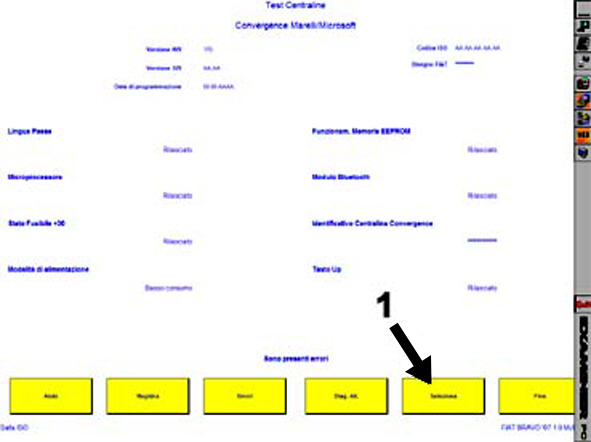
- Press continue and the screen in Fig. 9 should appear
Fig. 8
- Press select (1 - Fig. 9) and the screen in Fig. 10 should appear
Fig. 9
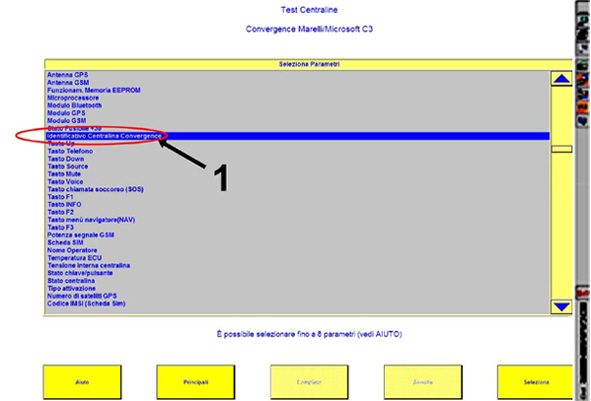
- Select the Convergence Control Unit identification parameter (1 - Fig. 10).
Fig. 10
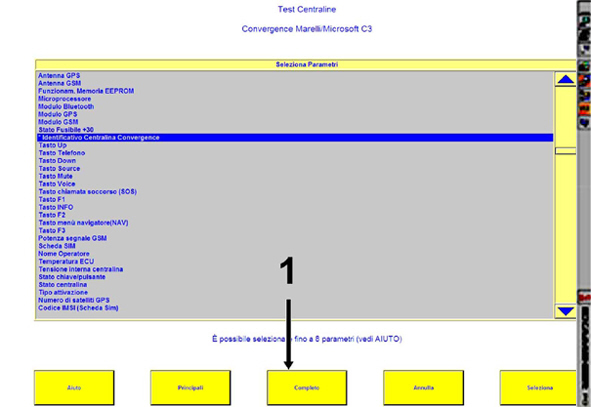
- Then press the end button (1 - Fig. 11) and the screen in Fig. 12 should appear
Fig. 11
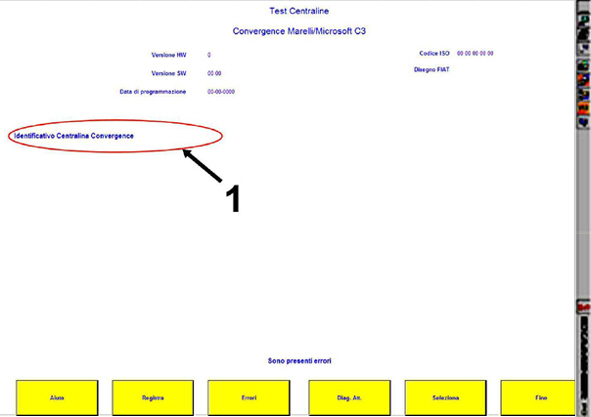
- Check the NIP code and note it down (1 - Fig. 12).
Fig. 12
Filling in and sending of the form
Download the file:
|
|
- unzip the file and print one of the PDF file pages.
|
|
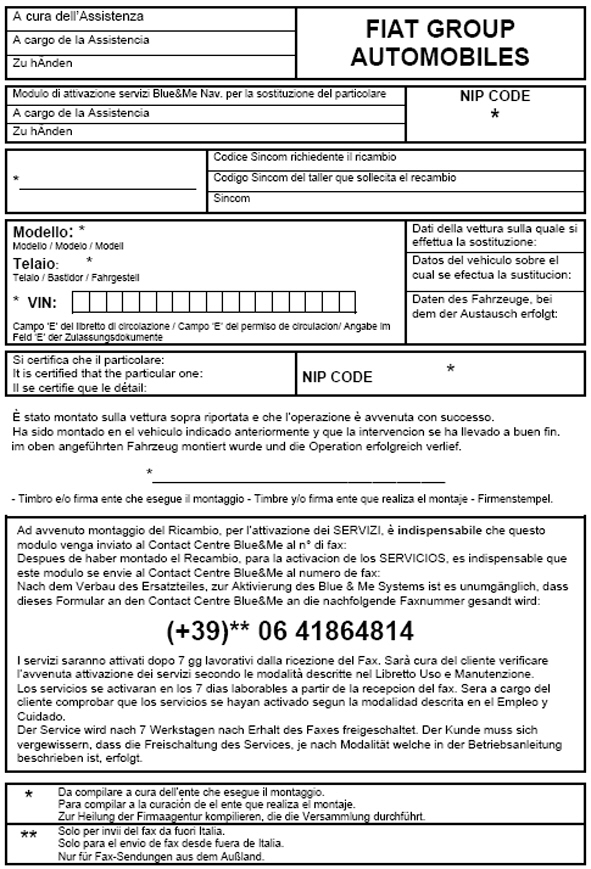
Two forms are available: one in Italian, English and French and one in Italian, Spanish and German (see Fig. 13 and 14); use one version only |
- fill in the fields in the form marked with an asterisk (*) and fax the form to the number given (+39 06 41864814)
- The services will be activated approximately 7 working days from the receipt of the fax. The customer will verify the activation of the services according to the procedures described in the Owner Handbook.
Fig. 13 - Example of form in Italian, English and French
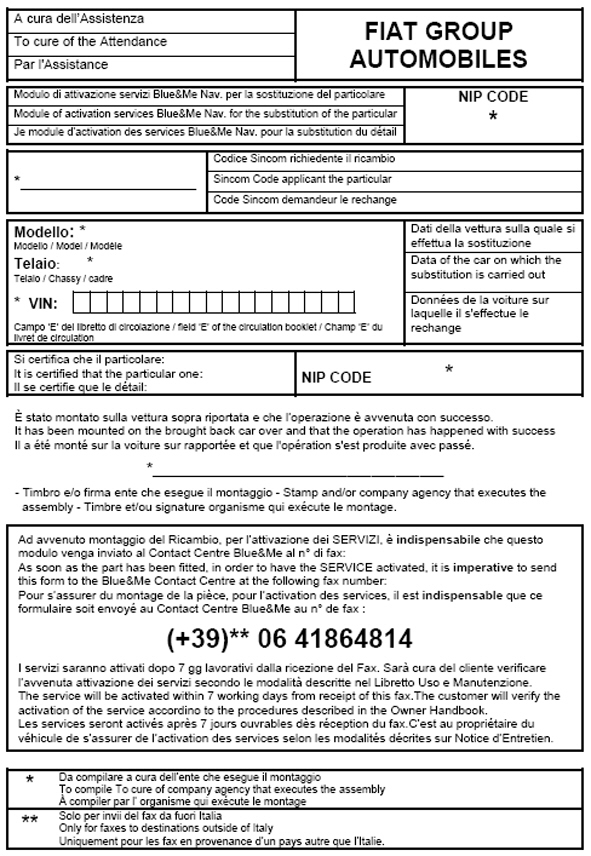
Fig. 14 - Example of form in Italian, Spanish and German
INFORMATION FOR THE CUSTOMER
Inform the Customer that reprogramming the Blue&Me system control unit introduces the following improvements upgrading the car to those currently produced.
- Some menu items could change; the differences are listed here below:
|
Before reprogramming |
After reprogramming |
|
M.M. PLAYER. |
MEDIA PLAYER |
|
CONTINUOUS PLAYING |
REPEAT TRACK |
|
UPDATE DEVICE |
(item removed) |
- Connection with phones already previously connected will automatically occur without intervention; for the first few connections immediately after the update the Bluetooth® connection could disconnect, as the Blue&Me NAV tests different connection protocols to find the best one for the type of phone.
- On some phones that support a particular protocol (PBAP) the menu item will be displayed as the Name and Surname regardless of how it is displayed on your phone.
- The update does not improve compatibility with AAC and MP4 where not already present on the car when delivered.
- For a correct music file playing, it is advisable to use USB memory sticks with audio files only; the presence of executable files or installation files for other programmes could involve slowing down or even stopping of the playing function.
CLAIM REPORT DATA
|
Version |
Operation |
Part |
Fault |
Position |
Time allowance |
|
All concerned models |
5570160 (*) |
1 |
R6 |
- |
0.30 (*) |
|
All concerned models |
5570161 (**) |
1 |
R6 |
- |
0.45 (**) |
(*) Operation Code and Time allowance for reprogramming the Blue&Me control unit.
(**) Operation Code and Time allowance for reprogramming the Blue&Me control unit plus reactivating the S.O.S. service.