





|






|
|
| Service News | ||
|
|
Alfa MiTo
All models with optional 68R |
|
|||
| 5570 1 651 R6 |
BLUE & ME™ SYSTEM - TOMTOM
Failed pairing between vehicle systems, Blue&Me™ and TomTom navigator - Service Solution |
|||

|
Cancels and replaces SN 55.22.10 of 22/12/2010 for new fault code (R6 instead of RA) |
CLAIMED FAULT
Failed pairing between vehicle systems, Blue&Me™ and TomTom navigator: the TomTom navigator cannot be paired through Bluetooth to the Blue&Me™ system, therefore it cannot be operated by the controls on the steering wheel or voice commands and the voice navigation instructions cannot be heard through the on-board sound system.
TECHNICAL CAUSE
Failed operation of the software application managing communication on Blue&Me™
OPERATIONS AT THE DEALERSHIPS
DEALERSHIP BEHAVIOUR STANDARDS TOWARDS THE CUSTOMER
- Once the customer's claimed fault is confirmed, reassure the Customer that it can be solved by reprogramming the Blue&Me system control unit.
- After completing the operation, illustrate what has been done and ensure that the Customer is satisfied.
Service Solution
Once the customer's claimed fault is confirmed, on vehicles with chassis number after 1132000, update the Blue&Me control unit using the specific software that can be downloaded from this SN, according to the Operating Cycle below.
OPERATION CYCLE
EQUIPMENT REQUIRED
To update the software, before proceeding, it is necessary to check for the availability of the following equipment:
- Personal Computer with Windows© 2000 / Windows© XP / Windows© VISTA.
- Internet connection to website.
- USB memory stick with manufacturer's certification of compatibility with Windows© 2000 / Windows© XP / Windows© VISTA operating systems.
SOFTWARE UPGRADE
- Download the file:

|
- Format a USB memory stick in FAT32 mode.
- Unzip the file in the newly-formatted memory USB stick.
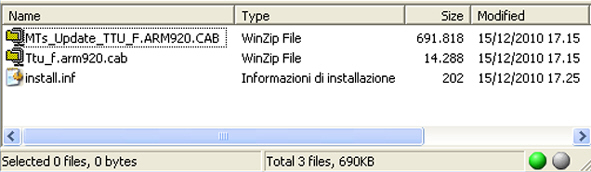
- Only the files shown in Fig. 1 should be present on the memory stick at the end of the operation:
Fig. 1
- Deactivate the memory stick using the Windows menu and remove it.

|
This operation is fundamental to prevent the files from being damaged. |
|
|
NEVER take out the USB memory stick and DO NOT press any button on the steering wheel before the software update procedure is completed successfully. |
- Get into the car
- Switch off possible mobiles paired
- Insert the USB stick in the connector
- Turn the ignition key to the MAR - ON position
- The dashboard will display a set of messages indicating operation progress UPGRADE IN PROGRESS and at the end: USB UPGRADE COMPLETED
- Remove the USB memory stick at the end of the operation
- Turn the ignition key to the STOP position.
- Disconnect and reconnect the battery.
- Operation completed
CLAIM REPORT DATA
|
Version |
Operation |
Part |
Fault |
Position |
Time allowance |
|
All concerned models |
5570165 |
1 |
R6 |
- |
0.40 |