





|






|
|
| Service News | ||
|
|
Alfa MiTo
All 1.4 16v TJet models with LPG supply |
|
|||
| 1057 0 000 AA |
LPG ECU
Software update procedure – Network Information |
|||

|
Cancels and replaces SN 10.18.10 of 14/06/2010 through the addition of the part number for the Landi harness to connect the PC to the LPG control unit. |
To upgrade the software of LPG ECUs a computer is required (preferably a laptop) with a special programme and a connection harness between PC and LPG ECU.
Here below you can find:
-Description of the material required-Installation on the PC of the LPG ECU reprogramming software-LPG ECU software automatic update-LPG ECU software manual update (in special cases only)-Replies to some frequent questions (FAQ) about the software updateDescription of the material required
To update the software of the LANDI LPG ECUs, the following is required:
1. Landi LPG ECU connecting harness
The harness, shown in Fig.1, is supplied to all main Dealerships for Italian market.
When required, it can be ordered to the Spare Parts Dpt. (part no. 2000038500).
Fig. 1
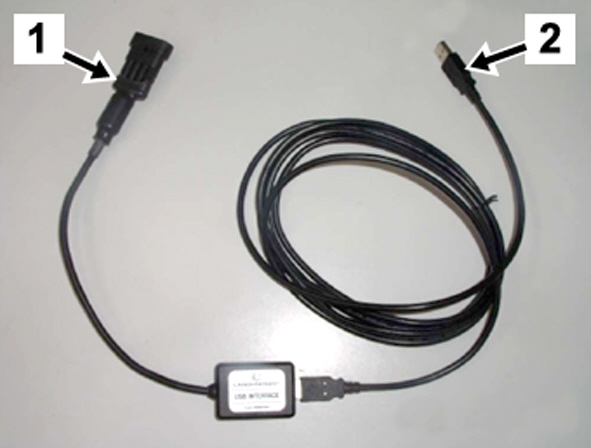
Key
1 – LPG ECU side port;
2 – PC side USB port.
2. Internet connection and reprogramming software:
Following this Service News the file to install on the PC the software to update Landi LPG ECUs can be downloaded.
3. Computer:
The connection harness is about 2-m long and therefore a PC (preferably a laptop) should be available close to the vehicle to be updated.
The LPG reprogramming software works with the following original operating systems, registered at Microsoft.
- Windows 98
- Windows 2000
- Windows XP
- Windows Vista
- Windows 7
OPERATION CYCLE
Installation of the lpg ecu reprogramming software
 | It could be necessary to download updates from the Microsoft server for the PC OS. The software should be original and registered at Microsoft. |
| The vehicle battery must be in full charge conditions so as to ensure a rated voltage of 12 V, during reprogramming. |
 |
Fig. 2
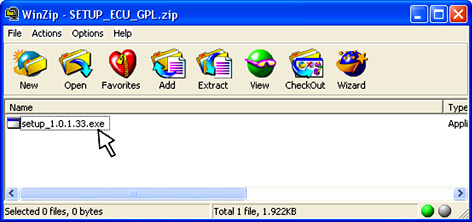
Fig. 3
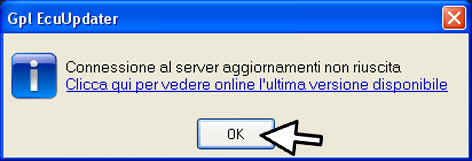
Fig. 4

Lpg ecu software automatic update
| Make sure that the LPG ECU reprogramming software release is the latest available (especially if the programme had already been installed previously); to check the release, see the first question in the FAQ list at the end of this Service News. |
Connect the USB port (2) of the Landi interface harness to the PC;
-Take out the protection cover and connect the interface harness (1) to the connection (A - Fig. 5), next to the LPG ECUFig. 5 - Diagnosis connection of the LPG control unit for Alfa MiTo
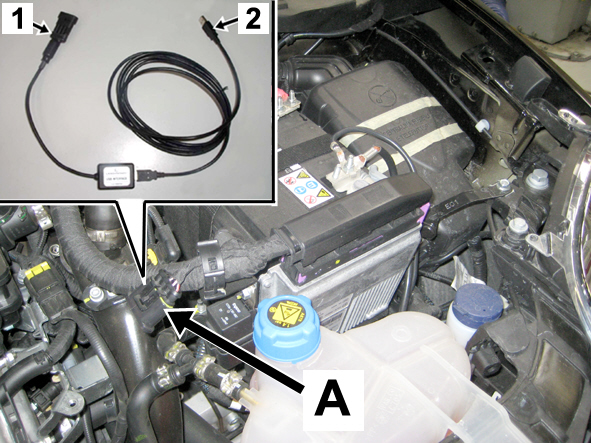
Fig. 6

Fig. 7
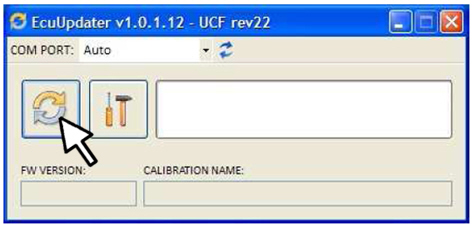
Fig. 8
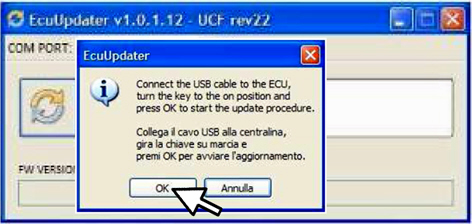
After pressing OK (Fig. 8) the programme reads the data in the ECU (Landi LPG ECU); if it finds out a software release in the LPG ECU that can be updated, the ECU update process starts automatically. The update is identified by the progress of the bar (Fig. 9).
Fig. 9
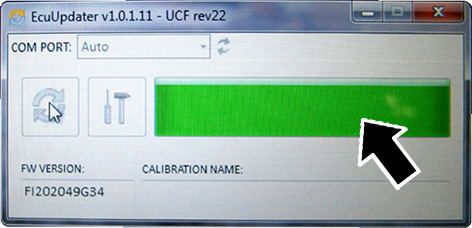
Fig. 10
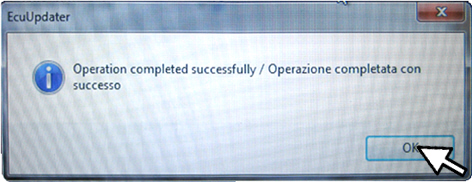
Fig. 11
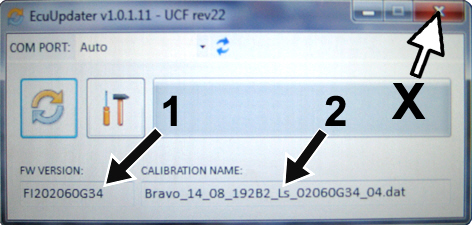
Now, the window (Fig. 12) displays:
-the identification code of the Firmware (1);-the identification code of the ECU software (2).Fig. 12
End of the reprogramming procedure
At the end of the reprogramming, the programme can be exited (click on X - Fig. 12); bring the car key back to STOP and disconnect the LPG ECU harness.
 | Remember to refit the protection plug for the connection port to the LPG ECU. |
Lpg ecu software manual update
| The manual updating procedure for the LPG ECU must be used only in the following events: |
| Whenever feasible, use always the automatic procedure and follow the manual one only if there is no other way of operating. |
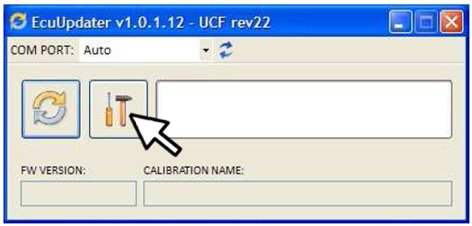
Start the LPG ECU update pressing the button shown in Fig. 13; the window shown in Fig. 14 is displayed.
Fig. 13
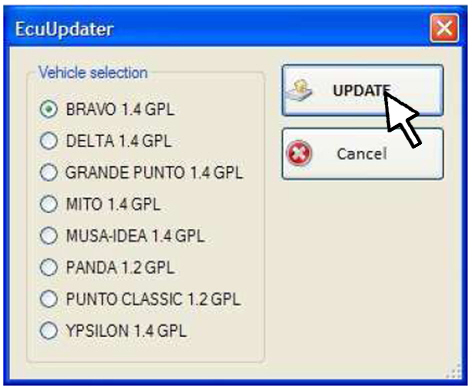
The window (Fig. 14) lists the models involved in the update:
-select the model involved;-click on the button UPDATE to update the software; the window shown in Fig. 15 is displayed. | Check the model and download the correct software. If a wrong software is downloaded, serious operating problems could occur on the vehicle. |
Fig. 14
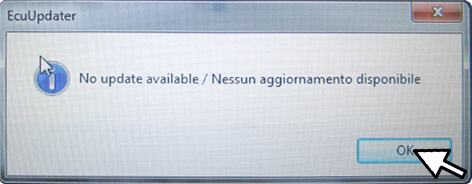
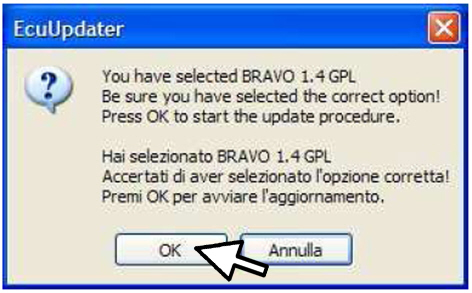
Confirm the selection (press OK) or, in case of doubt, cancel it to go back to the previous screen (Fig. 14)
After pressing OK, the programme updates the ECU software automatically.
Fig. 15
If the process is completed correctly, the window shown in Fig. 16 is displayed; click on OK to exit. The window shown in Fig. 17 is displayed.
Fig. 16
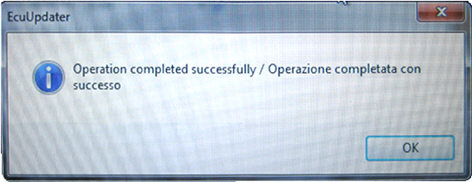
The manual update process is completed when the bar ends scrolling and the selection buttons are deactivated.
The window of Fig. 17 shows:
-the identification code of the Firmware (1);-the identification code of the ECU software (2).Fig. 17
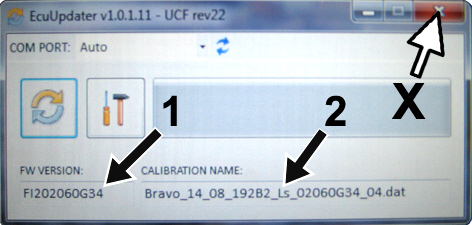
End of the reprogramming procedure
At the end of the reprogramming, the programme can be exited (click on X - Fig. 12); bring the car key back to STOP and disconnect the LPG ECU harness.
| Remember to refit the protection plug for the connection port to the LPG ECU. |
Faq and reporting of possible faults during the lpg ecu software update process.
Here below follow some replies to some frequent questions (FAQ) about the software update:
How can I understand if the LPG ECU update software loaded on my PC is the latest release available?
You need to compare the software release loaded on the PC with the software release that can be downloaded following this Service News.
-Double click on the icon of the Desktop (Fig. 6): the screen shown in Fig. 18 is displayed. In the point shown by the arrow, you can find the number of the software release of your PC.-Click on the link SETUP_ECU_GPL.zip at the beginning of this Service News and open the file; the numbers in the name of the file (e.g. Setup_1.0.1.33.exe) correspond to the software release.Fig. 18
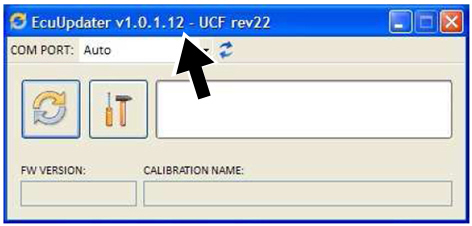
Which software release is loaded on the LPG ECU?
The LPG ECU update software that can be downloaded according to this Service News always corresponds to the latest available release of the ECU hardware. If the software in the LPG ECU is the latest release, no update is performed.
Which are the controls made by the software before starting the update?
The software checks and compares the firmware and the calibration on the LPG ECU. In this way, it can recognise the car model, the LPG ECU hardware and know if the software needs updating.
For which models and for which problems can I use the LPG ECU update software?
The software can be used for all LPG cars. It can also be used to solve the following problems:
-Grande Punto switching off at idling (for all LPG ECU hardware)-Bravo with injector error during release at 1500/2000 rpm.-All vehicles with Examiner diagnosis problems.To handle the above cases, refer to the relevant Service News and/or Campaigns.
Do you always need to have an Internet connection to update the Landi LPG ECUs?
No, the connection is required to download the software to be installed and to check for possible updates. Once the software has been installed on the PC, you can work locally.
In case of operating problems about the use of the LPG ECU update software, contact Te.Se.O.